Download
A ready-made package with everything inside: the 1.9.2 port and BBSC. No launcher to configure. The game and the package windows follow your Windows language (English, or Portuguese on a Brazilian Windows).
- The session survives deaths, lamps, area changes and bosses
- Guests follow the host and respawn with the group
- Everyone keeps their own character, levels, echoes and items
- Guests get the boss rewards too
- Special bells already in your inventory, no Insight needed
- PvP inside the group whenever you want (Duel Bell)
An account here
The same Caçadores BR server account. No account? Create one in a minute.
Your copy of the game
The CUSA03173 folder, version 1.09, the same one you already use with the port's launcher.
Everyone on the package
Players on the regular launcher can't find players on Seamless Co-op. The whole group uses this package.
1Install
Only the first time. Takes a minute.
 Jogar Seamless Co-opclick here3
- Download the package with the Download Seamless Co-op button.
- Right-click the downloaded file and choose Extract All. Any folder works, for example C:\Games. Don't open Jogar Seamless Co-op from inside the zip without extracting it: it won't work.
- Open the extracted folder and double-click Jogar Seamless Co-op ("Play Seamless Co-op"), the bell icon. From now on you always start the game with it (or with the desktop shortcut). If "Windows protected your PC" shows up, click More info and then Run anyway. If the Firewall asks whether the game may use the network, click Allow.
2The first time
The first time, it looks for your game, your account and your character by itself, and only asks about what it can't find.
Enter the username and password of your Caçadores BR account (the same one as in the regular launcher).
No account? Create one at cacadoresbr.com/en
Do you want a Seamless Co-op shortcut on your desktop?
I copied your character from the regular bbport into Seamless Co-op.
The original save was NOT touched: whatever happens in Seamless Co-op stays here.
- The game: it uses the same folder as the port's launcher. If it can't find it, it tells you and opens a window: go into the CUSA03173 folder and pick the eboot.bin file.
- The account: if you already play on our server through the launcher, it takes the username and password from there and checks them by itself. If not, this window shows up: enter the username (not the email) and password of your account here and click Sign in. If it says the username or password is wrong, check upper and lower case. Forgot the password? Create another account on the site.
- The shortcut: it asks whether you want the bell icon on your desktop. Click Yes and you can start the game right from there.
- The character: it makes a copy of your save from the regular launcher and tells you. Click OK and the game opens. The saves are separate: what you do in Seamless Co-op doesn't show up in the regular launcher, and vice versa. Your original save stays untouched.
- From the second time on no windows show up: double-click Jogar Seamless Co-op (or the shortcut) and the game opens straight away, already online. When a new version comes out, it downloads it by itself before opening the game and shows a small window saying what changed. Just click OK.
3Playing together
In the game, the Seamless Co-op bells are in your inventory, in the Consumables tab, at the end of the list.
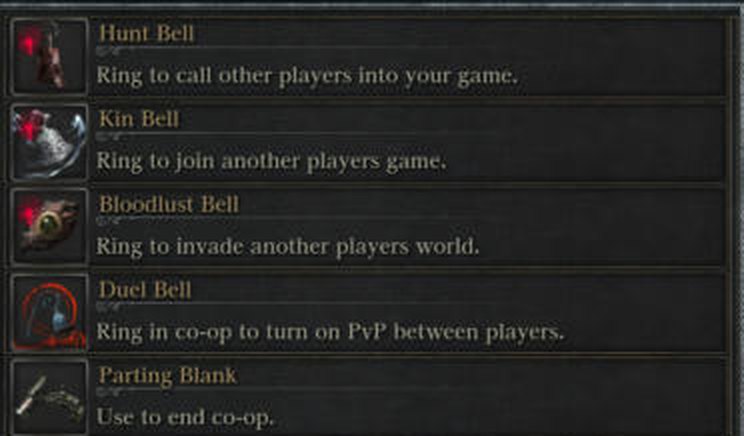
- Hunt BellCalls the others into your world. · the host
- Kin BellJoins the world of whoever rang the Hunt Bell. · the guests
- Bloodlust BellInvades another player's world (PvP).
- Duel BellDuring co-op, turns PvP between you on or off. Ring it again to turn it off.
- Parting BlankEnds the co-op. Everyone goes back to their own world.
To join a friend's world
- Both of you start the game with Jogar Seamless Co-op and load your characters.
- Agree on who is the host: you will play in the host's world, and boss and shortcut progress is the host's.
- The host rings the Hunt Bell. The guest rings the Kin Bell. Use the same summoning password in the game's network settings, so you find each other and not other players.
- Wait a little: the guest shows up in the host's world. If you are in different areas, it can take about 2 minutes.
- Done: from here on the session keeps going by itself. The guest follows the host across areas and lamps, and whoever dies comes back with the group. To finish, use the Parting Blank.
FAQ
I rang the bell and my friend doesn't show up
Check that both of you started with Jogar Seamless Co-op (the regular launcher can't find Seamless Co-op players), that you use the same summoning password and that one rang the Hunt Bell and the other the Kin Bell. Wait about 2 minutes before trying again. If it still doesn't work, both of you close the game and open it again.
The bells are gone from my inventory
Right after you load your character, the mod takes a few seconds to add the bells. If they don't show up, the Bath Messengers in the Hunter's Dream give them to you again for free.
My antivirus complained about bbsc-launch.exe
That's expected: it "injects" the mod into the game, and some antivirus programs find that suspicious. The package is made only of free software and the source code is in the ferramentas\fonte folder. If the antivirus deletes the file, restore it and add the package folder to the exceptions. If it deletes Jogar Seamless Co-op, you can start the game with ferramentas\JOGAR.cmd in the meantime.
I don't see other players' messages, bloodstains or ghosts
That's normal while it's in testing: Seamless Co-op uses a separate server that only handles co-op.
How do I update the package?
You don't have to do anything: every time you start with Jogar Seamless Co-op, it checks our site for a new version, downloads only what changed and then opens the game. Without internet, it opens the version you already have. Updates never touch your saves, your account or your settings.
Only if you downloaded the package before October 21 do you need to download it once more, because that version didn't update itself yet. Extract it over the old folder and choose Replace the files in the destination: your Seamless Co-op character and your account stay.
I said "No" to the shortcut and now I want it
In the package folder, right-click Jogar Seamless Co-op and choose Show more options → Send to → Desktop (create shortcut).
Does my Seamless Co-op progress carry over to the regular launcher?
No. The package uses a copy of your character, kept inside the package folder in bbport\user\savedata. Your regular launcher save stays as it was before the copy.
I want to change the account or the game folder
Delete the file ferramentas\minha-config.json inside the package folder. The next time you open Jogar Seamless Co-op, it looks for the game and the account again and asks about what it can't find.
I got an error or the game closed by itself
Post on our Discord the time, who was hosting and these files from the package folder: the newest one in bbsc\logs, bbport\user\bbsc-run-errors.log, ferramentas\jogar.log and ferramentas\atualizar.log.